
Start with what you want to save
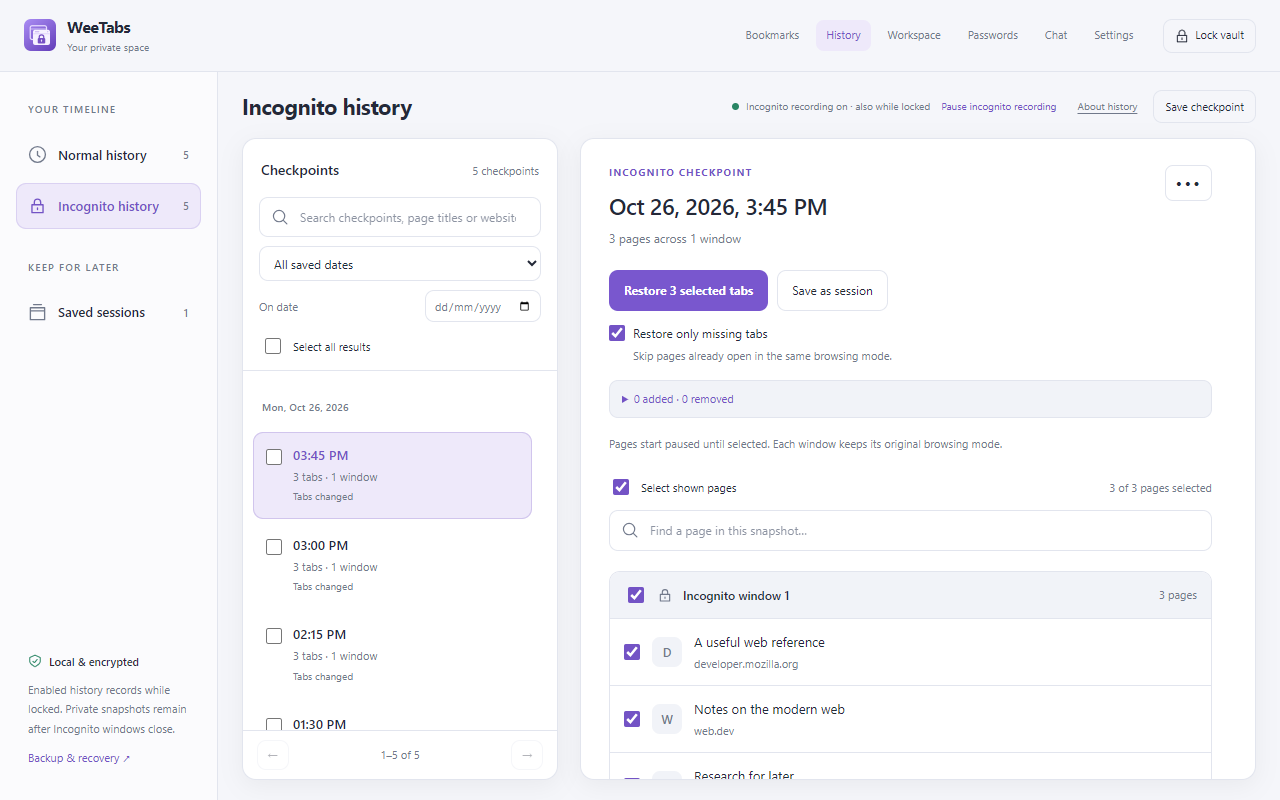
Both tools help you return to groups of tabs. Session Buddy focuses on tab and bookmark collections with a history timeline and search. WeeTabs combines bookmarks and tab-history checkpoints in its own password-protected vault, with an interface usable in the side panel or a full-page manager.
The practical question is what you need between saving and restoring. Do you mainly want to manage a busy set of windows and transfer collections? Or do you want a separate saved collection that must be unlocked before it can be read? Neither answer makes one product right for every person.
This comparison is written by WeeTabs. Our side describes the current 2.36.2 build, which is being prepared for Chrome Web Store launch. Competitor facts come from the official sources linked below, checked on . We have not performed a security audit of either product.
Compare the actual workflows
| Workflow | WeeTabs 2.36.2 | Session Buddy |
|---|---|---|
| Primary workflow | Separate encrypted bookmark vault, tab checkpoints and named sessions, in side panel/full view. | Tab and bookmark collections, timeline and search. Session Buddy: product features |
| Preview and restore | Preview saved pages, select what to restore; optional paused bulk opening. | Full or selected restoration to original, one or current window. Session Buddy: product features |
| Password lock / encryption | Vault password protects WeeTabs’ saved collection. Open tabs and Chrome originals remain visible. | Local storage documented. Vault password lock and encryption-at-rest details unverified; local storage alone does not establish either. Session Buddy: privacy policy |
| Tab suspension | Manual suspension, optional idle discard, exceptions and paused bulk restore. | Saving/closing tabs is documented. A separate tab-suspender feature is unverified. Session Buddy: product features |
| Incognito controls | Independent normal/private recording switches and separate history views; permission required. | Incognito folders and opening permission documented. Session Buddy: tab open permissions |
| Notes / password tools | Pro Notes/checklists/linked pages and optional HTTPS password assistance; 21-day local trial. | Comparable built-in Notes/password tools unverified in reviewed feature documentation. Session Buddy: product features |
| Storage / cloud choices | Local tools without an account. Paid, separately configured encrypted cloud recovery and device sync. | Collections/history/settings local. Store FAQ describes cloud storage and sync as future work. Session Buddy: privacy policy; Session Buddy: publisher’s Chrome Web Store listing |
| Export / recovery | Encrypted local file backup; selected-category paid cloud versions. Chat is separate. | Collection exports; backup/restore includes collections and history. Session Buddy: import and export; Session Buddy: backup and restore |
| Price | Free local essentials; Pro US$2.99/month or US$24.99/year, renewing until cancelled. | Publisher’s listing says current features are free without an account. Future cloud pricing is not specified there. Session Buddy: publisher’s Chrome Web Store listing |
We do not infer that Session Buddy is unsafe or unencrypted from missing specifications. Check its current documentation or ask its developer if a particular protection is essential to your decision.
Separate local storage from a password lock
Session Buddy’s privacy policy says collections, history and settings stay on the device. It also describes anonymous usage statistics and how to opt out. Keeping link data locally and requiring a password to decrypt a saved collection are separate design choices; neither phrase should be used as a substitute for the other.
WeeTabs stores its own supported saved categories encrypted and hides them behind the vault lock. This does not hide Chrome’s own bookmarks/history, lock open pages or provide network anonymity. Its local tools need no account. Cloud services and Chat have separate account, metadata and retention considerations described in the WeeTabs privacy policy.
A forgotten vault password cannot be recovered. Keep a local offline backup and its password safely. Paid cloud backup covers the categories chosen when it ran; device sync does not transfer automatic history or open tabs. Choose cloud settings deliberately rather than treating a Pro subscription as proof that every category is backed up.
Choose the tool that fits
Consider Session Buddy if you want collections, a tab timeline and flexible collection transfer without adding a separate vault-unlock step. Its official documentation explains the difference between exporting collections and backing up history too.
Consider WeeTabs if your priority is keeping a separate saved collection behind your vault password, working beside the page, or combining that with linked Notes, optional password help and separately chosen cloud services. Those extra tools have Free/Pro boundaries, not one blanket free entitlement.
Try a small, non-sensitive research group first. Save it, find one page, restore just that page and create a recovery copy. This reveals whether the actual workflow fits you better than a long feature checklist. WeeTabs’ official installation link will appear after Store publication; it is not publicly installable from this page yet.
Move links carefully; keep the original backup
There is no implemented automatic Session Buddy or Workona importer in WeeTabs. A Session Buddy recovery file is not a WeeTabs encrypted backup. Do not rename a file or assume that extensions share formats because both save tabs.
For a small transfer, open the pages you intentionally want to move, review the browsing mode, then use WeeTabs’ Save window or save individual links. Chrome bookmark import copies Chrome’s own bookmark collection; it does not read Session Buddy’s database. Validate a small group before changing your source collection.
This approach copies page addresses. It does not transfer Session Buddy’s history timeline, folder metadata, website cookies, authenticated login state or unsaved page content. Keep a native backup from the original tool so you can return to it if the trial workflow does not suit you.
Official sources and checking date
Checked on . Session Buddy’s Store listing showed version 4.1.2; its privacy policy was dated 11 February 2026. Product features and pricing can change. These links support the comparison, rather than third-party reviews or assumed omissions.
- Session Buddy: product features
- Session Buddy: publisher’s Chrome Web Store listing
- Session Buddy: privacy policy
- Session Buddy: backup and restore
- Session Buddy: tab open permissions
- Session Buddy: import and export
Unverified points: Session Buddy password locking, its encryption-at-rest specification, a standalone suspension feature and comparable Notes/password tools. We are making no claim of absence or inferior security.